For developers and charge point operators
Build the pipeline from facts, not forecasts.
Rank real lots on real data across your target markets, then see a layout, the electrical load and a budget estimate before you spend on a site walk. The scoring is the same in every state you search.
Closed beta. All 50 states.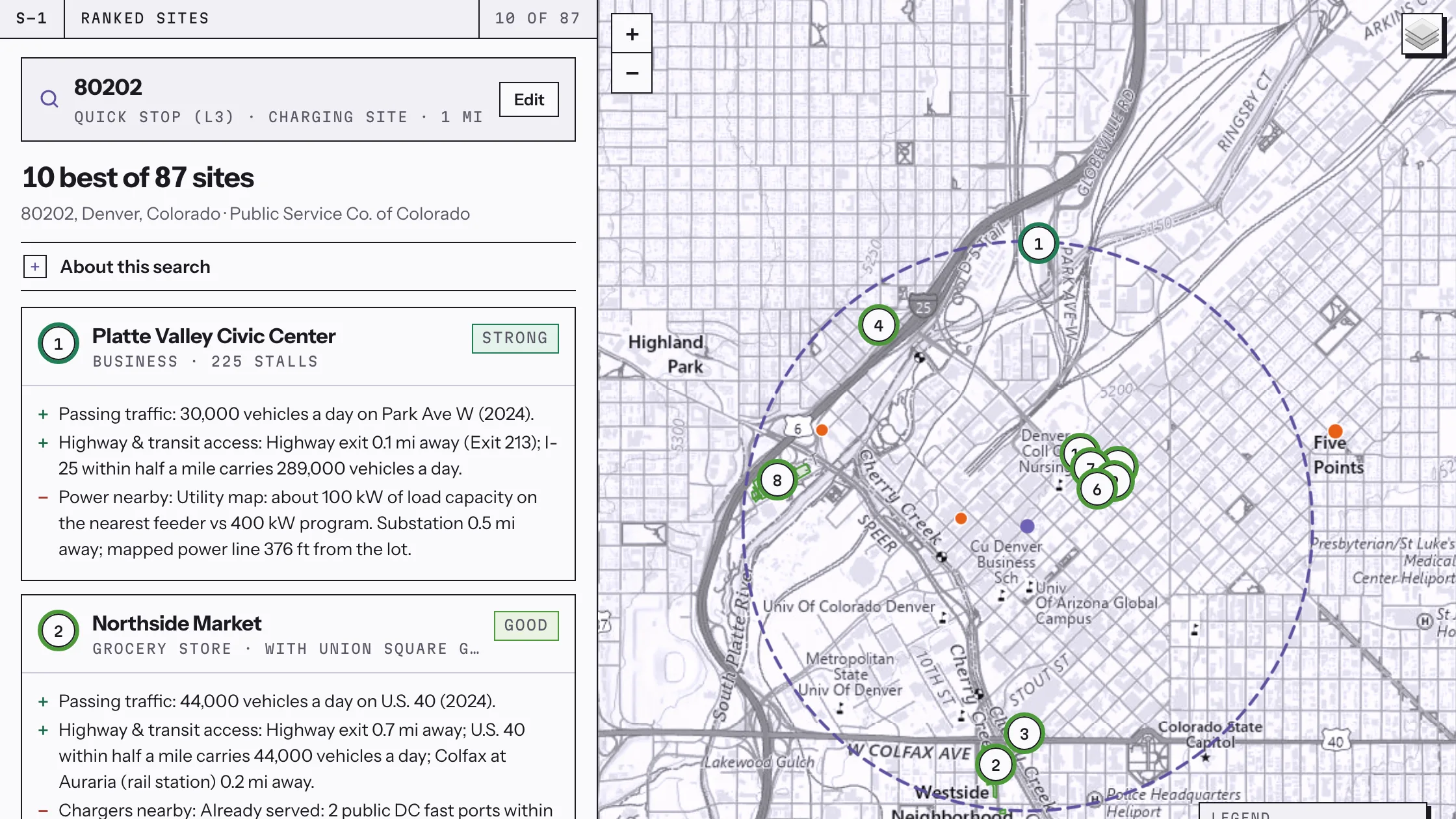
The two questions
Which sites are worth chasing, and what will each one take?
Most site tools answer the first question with a demand forecast. CRBCUT answers both, and shows you where every number came from.
-
Screening
A ranked list, not a heat map.
Every lot in the search area is scored on nine layers: traffic, corridor access, the charging gap, a grid screen, real-estate fit, nearby amenities, lot size, demand and incentives.
-
Buildability
Power, room and utility rules.
The grid screen reads mapped substations, lines and utility capacity maps. Capacity maps from more than 12 utilities are on file. A site that cannot be powered shows that before you visit it.
-
Evidence
Every score shows its work.
Each score cites its source and its confidence. Missing data is flagged as missing and never scored as zero, so a thin market does not look like a bad one.
The workflow
From a zip code to a utility packet.
Screen a market in seconds.
Search by zip, address or map pin.
Pick a radius and a use case, quick stop or long stay, a few ports or a hub. Lots in an area that is already built rank in seconds. The first search in a new area takes longer while its data builds, and is quick after that.
See what each site takes.
A layout on the aerial in one to three minutes.
AI reads the aerial, converts existing striped stalls and places chargers, switchgear and the transformer or tie-in. The engine sizes every breaker, conductor and conduit, checks voltage drop and cites the code section for each number. You see the stall count, the trench length and whether the existing service can carry the load.
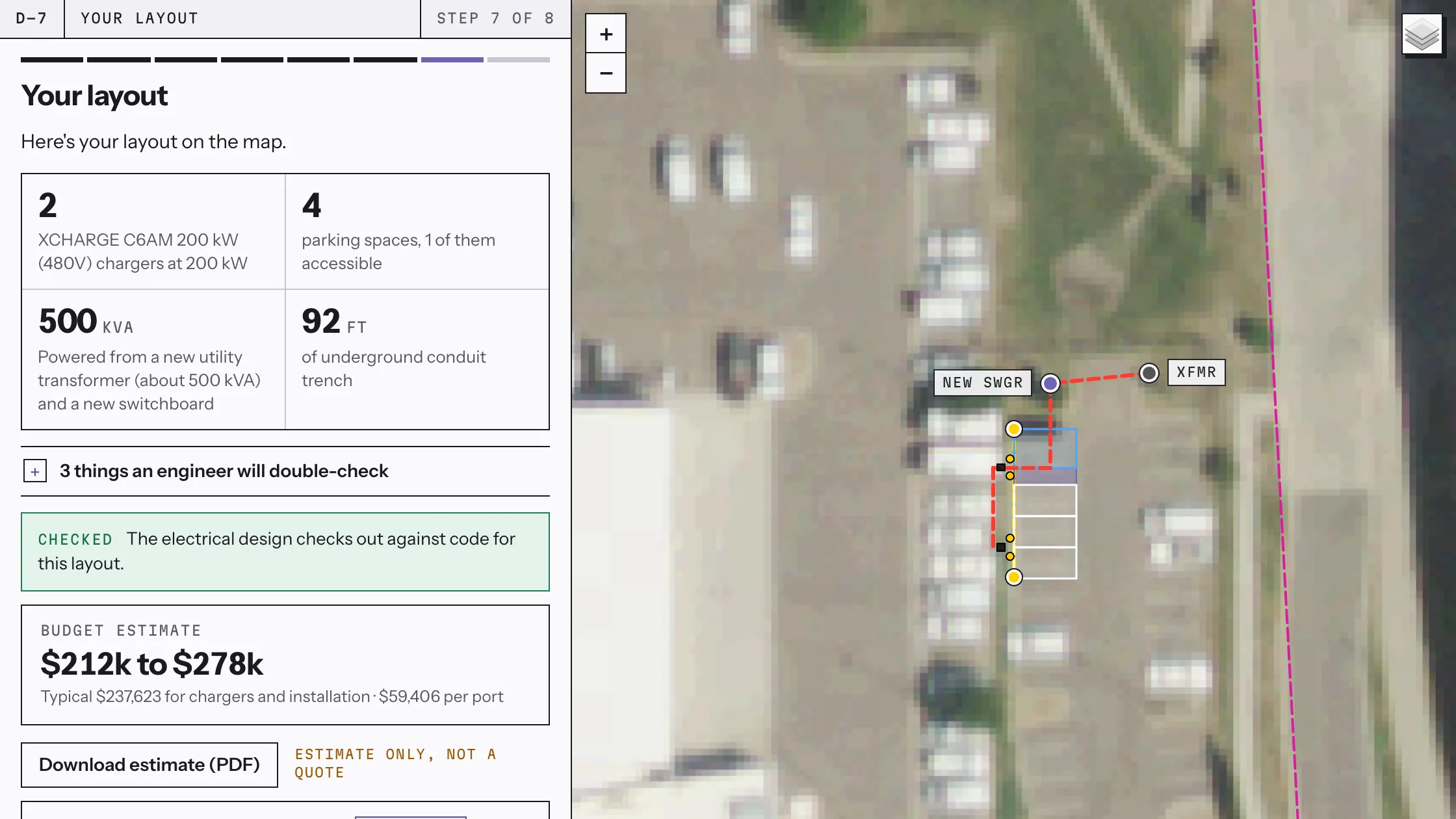
- Trench length measured
- Checked against code
- Drawn on the aerial
- Budget estimate included
Solve the power problem on paper.
A battery when the grid falls short.
When the chargers can draw more than the utility's capacity map shows is available, CRBCUT sizes a battery to cover the gap. It compares units from several makers on cost, savings and payback, and places the battery on the plan with its circuit and fire-code spacing.
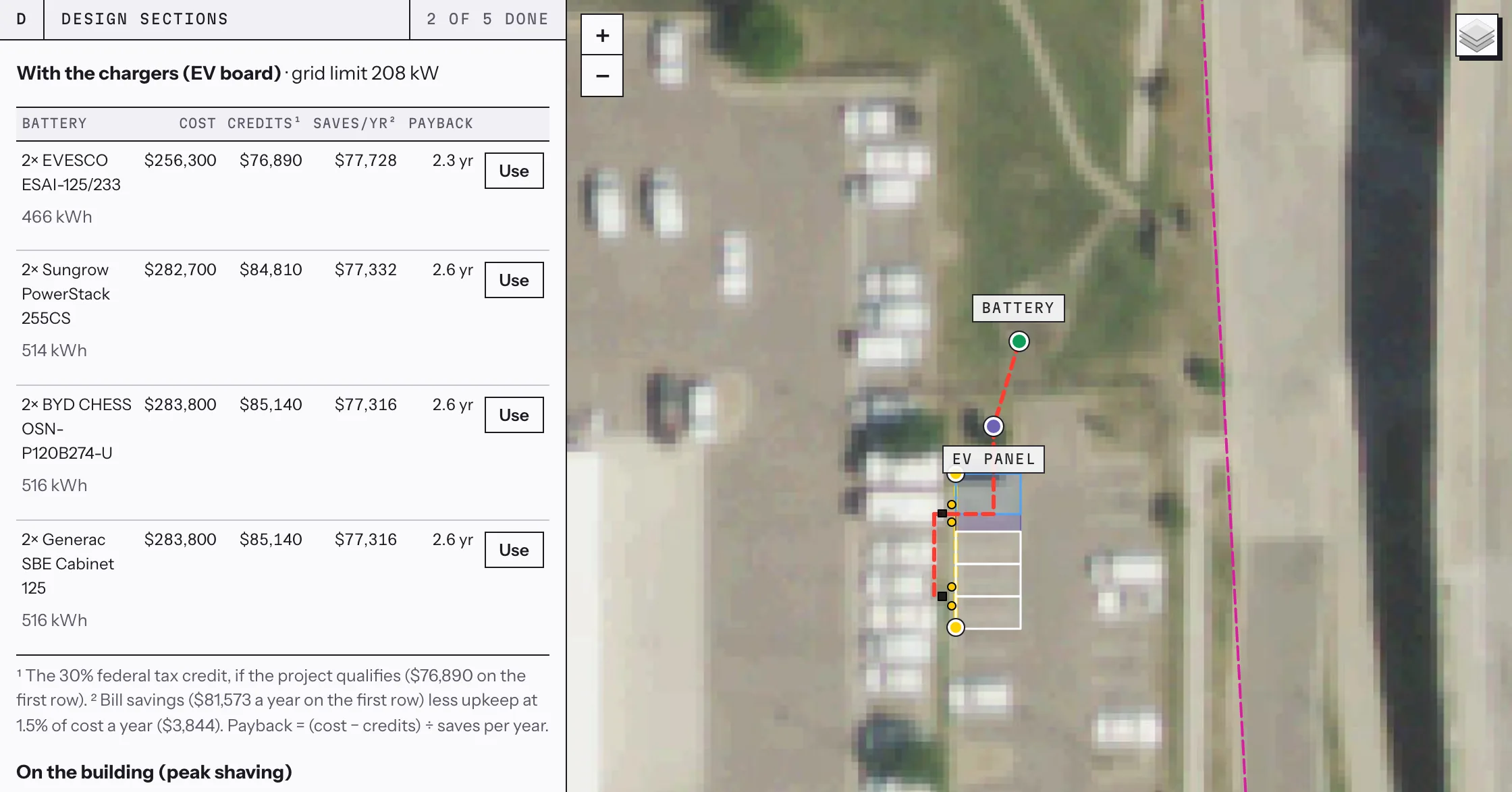
- Grid draw capped at 208 kW
- Four makers compared
- Payback math on screen
- Placed on the plan
Walk in with a drawing set.
Something your EPC can price.
A pricing set (CD50) has the site plans on the aerial, a one-line diagram, load calculations and schedules. A fuller set (CD100) adds details, elevations, signage and an electrical plan, marked for engineer review. Exports are PDF, CAD, bill of materials and a calculation report.
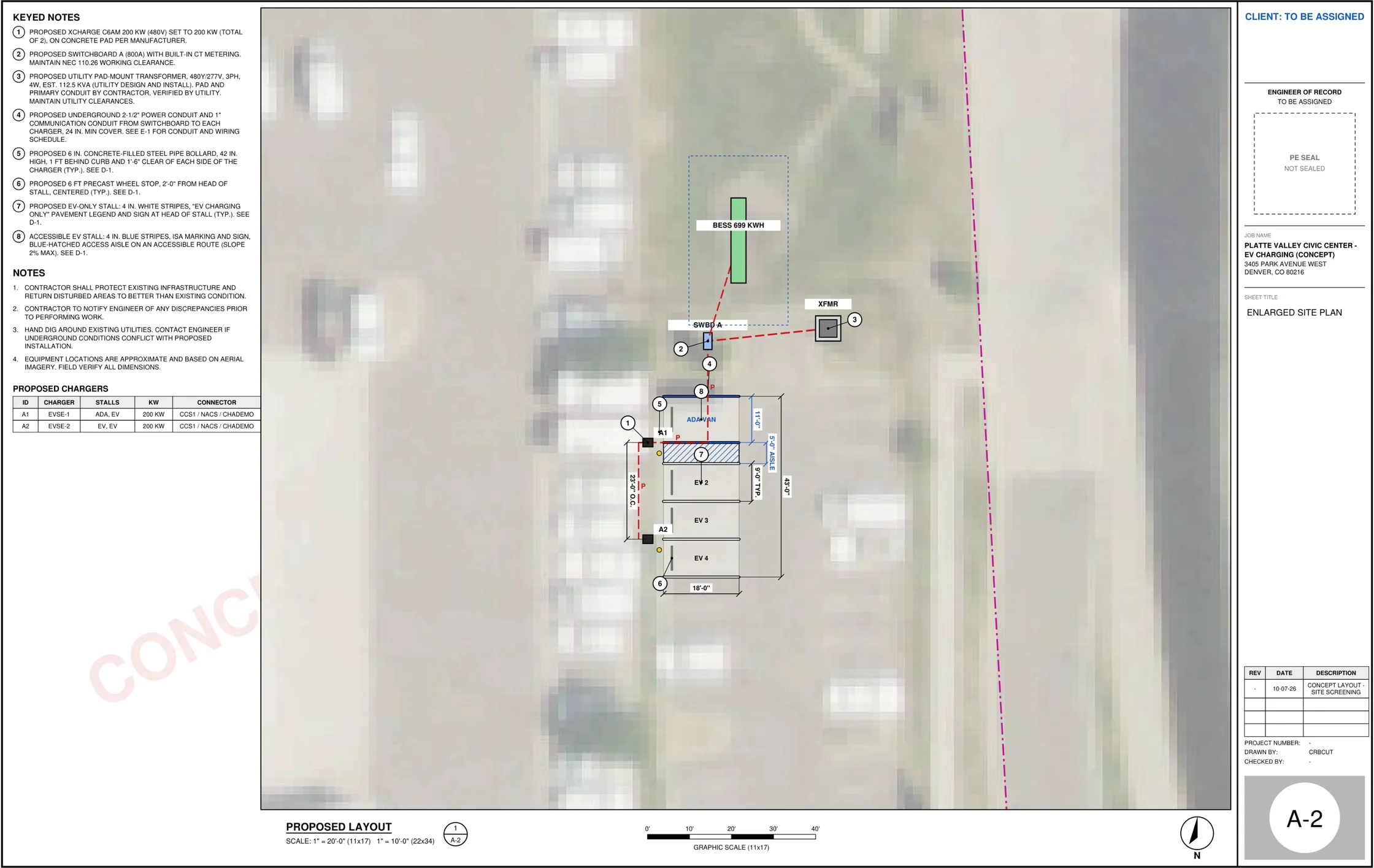
- Keyed notes and schedule
- Battery on the plan
- Room for your engineer's seal
Know what it costs.
A budget estimate before you pay for a bid.
CRBCUT prices the design's own materials list from a sourced pricebook of 3,502 items and rolls it up by scope: gear, electrical, civil and boring, and soft costs. You get a low, typical and high range, with potential incentives shown beside the full cost, and a branded PDF to take to your finance team. It is a budget estimate, not a quote.
Get the utility moving.
The application, prepared from the same design.
CRBCUT fills the utility's own load letter and application forms from the design and checks every file against the drawings. A tracker follows each case to an energized meter across your portfolio, and AI reads the utility's design and cost letters and flags anything that changed. You or your agent sign and file.
Pro mode is built for this work. It shows every score, input, source and weight, and lets you set the electrical assumptions yourself.
Who does what
Built to work with your engineer and your utility.
CRBCUT does the first pass so the people you already work with can spend their time on the decisions that need them.
- Your utility confirms service.
- The grid check tells you which sites to ask about first, so the utility conversation starts with a short list and a load number.
- Your engineer seals the set.
- CRBCUT drafts and assembles the checks. Your licensed engineer of record reviews it through six logged gates and applies the seal.
- Your team walks the site.
- Layouts come from aerial imagery. The site walk confirms underground utilities, grades and what the landlord wants, with a plan already in hand.
- Your estimator checks the budget.
- Every line shows its seller, link and date, and anything we cannot price says so. The estimate gets you to a go or no-go. The bid still comes from the people who build it.
- Incentives get verified.
- We show the programs we find. Once a person has verified one, it counts toward the score.
Questions developers ask
Short answers.
- Which states does it cover?
- All 50. A new area builds its data on the first search and keeps it, so the product gets faster and deeper in your markets the more you use it.
- Can I use my own engineer or EPC?
- Yes. Export the set and hand it over, or have your engineer of record review it in the engineer workspace.
- Which chargers and batteries can I design with?
- The equipment library is maker-neutral. You pick the equipment, or let the tool suggest options and compare them.
- Does it file my utility application?
- No. It prepares the application on the utility's own forms and checks it against the drawings. You or your agent sign and file it.
- Is the estimate a quote?
- No. It is a budget estimate built from sourced prices, for deciding which sites to take forward. Your EPC prices the build.
- What does it cost?
- Pricing is coming soon and is being set with beta users.
Early access
Tell us which markets you are working.
CRBCUT is in closed beta. Say where you are siting and roughly how many sites a year, and we will send an invite as places open up.
Pricing: coming soon.
Plans are being set with beta users. We will tell you before anything changes.